Quick answer
If Wi-Fi is fast but Ethernet is slow on the same PC, check the Ethernet link speed first.
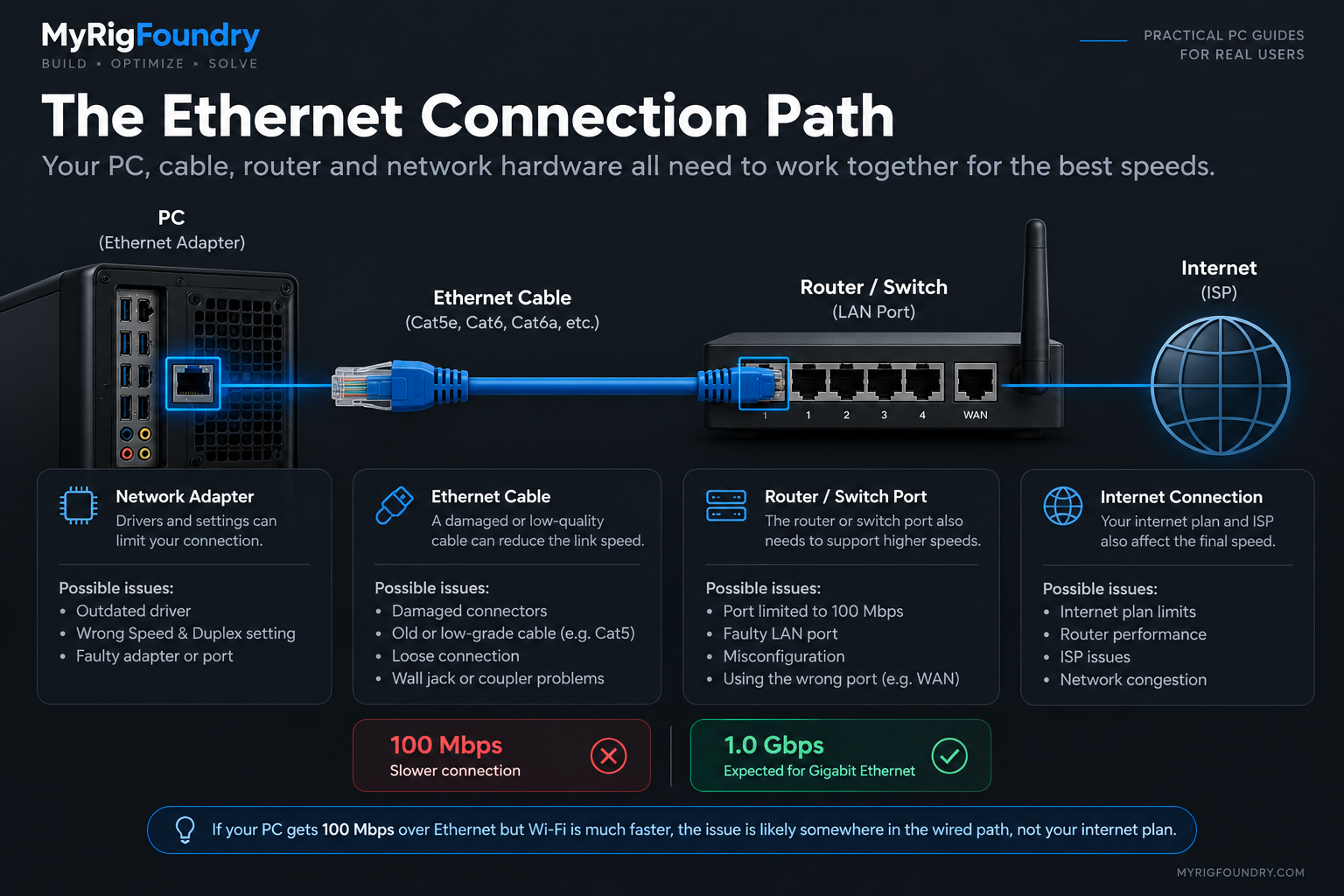
A connection that should be running at Gigabit speeds but negotiates at only 100 Mbps strongly points toward the wired connection itself. The Ethernet cable, router or switch port, network adapter, driver, or adapter configuration may be limiting the connection.
Test the simplest variables first: another cable, another LAN port, and the Ethernet link speed reported by Windows.
Ethernet is usually chosen because it provides a stable wired connection, so seeing Wi-Fi outperform it can seem backwards.
But Wi-Fi and Ethernet use different hardware and different paths between your PC and router.
That means fast Wi-Fi does not guarantee that the wired side of the network is working correctly.
If the same computer gets good speeds over Wi-Fi but becomes significantly slower when you connect Ethernet, you have already learned something useful: the internet connection itself may not be the first thing to blame.
The goal is to isolate the wired path.
First, compare Ethernet and Wi-Fi fairly
Before changing drivers or adapter settings, make sure the speed difference is real.
Run a speed test using Wi-Fi.
Then:
- Disconnect Wi-Fi.
- Connect the Ethernet cable.
- Wait for Windows to establish the connection.
- Run the same speed test again.
- Use the same server if the speed test allows you to choose one.
Do not run downloads, game updates, cloud backups or other bandwidth-heavy tasks during either test.
A small difference between Wi-Fi and Ethernet does not necessarily indicate a problem.
A large and repeatable difference does.
For example, if Wi-Fi repeatedly reaches several hundred Mbps while Ethernet repeatedly stops around the same much lower ceiling, investigate the wired connection.
| What you see | What to investigate |
|---|---|
| Ethernet repeatedly stops near 90–95 Mbps | Check whether the Ethernet link negotiated at 100 Mbps |
| Another cable immediately fixes it | Original cable or its connectors are likely involved |
| Another router LAN port fixes it | Original port or its configuration deserves investigation |
| Ethernet is slow only on one PC | PC adapter, driver or configuration becomes more suspicious |
| Multiple wired devices are slow | Router, switch or another shared network component becomes more suspicious |
| Wi-Fi and Ethernet are both slow | The issue may be broader than the Ethernet connection |
This comparison prevents you from troubleshooting the wrong part of the network.
Check the Ethernet link speed
This is one of the most useful checks for this particular problem.
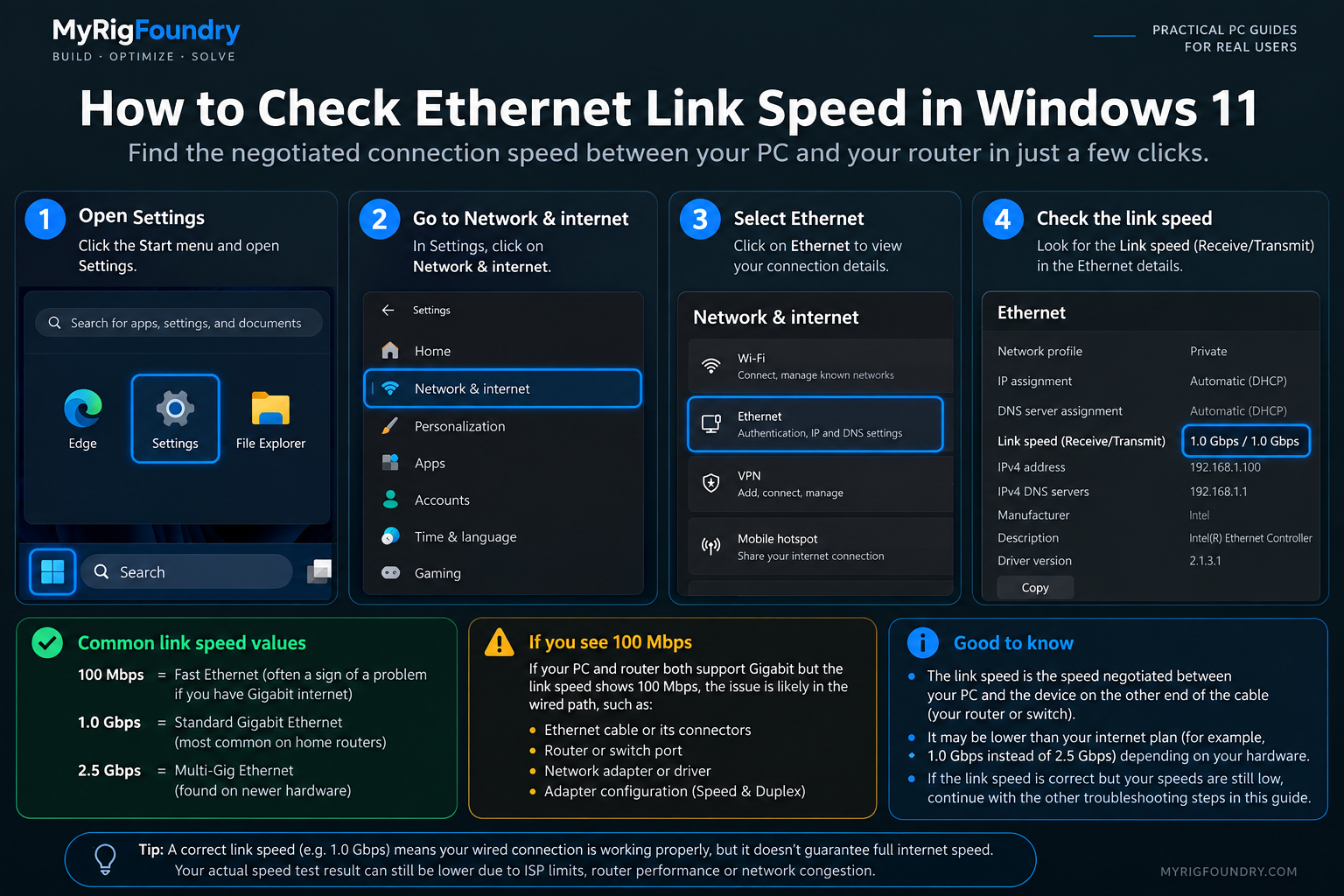
The link speed is the connection negotiated between your Ethernet adapter and the device on the other end of the cable, usually your router or switch.
On Windows 11, you can inspect your Ethernet connection through:
Settings → Network & internet → Ethernet
Depending on your Windows version and adapter, connection information may also be available through the classic network adapter interface.
You are looking for the negotiated connection speed.
Common values include:
- 100 Mbps
- 1.0 Gbps
- 2.5 Gbps
The number you should expect depends on the capabilities of both ends of the connection.
A 2.5 GbE PC connected to a Gigabit router port, for example, will not establish a 2.5 Gbps link through that port.
Why a 100 Mbps link is an important clue
Suppose you have:
- a Gigabit-capable Ethernet adapter
- a Gigabit-capable router port
- appropriate cabling
but Windows reports a 100 Mbps Ethernet link.
That is much more informative than simply knowing that an internet speed test is slow.
The wired connection has negotiated below the expected Gigabit link rate.
At that point, test the physical connection before changing lots of Windows settings.
Try another Ethernet cable
The cable is one of the easiest variables to eliminate.
Disconnect the current Ethernet cable and test with another known-good cable.
Then check the link speed again.
If the connection changes from 100 Mbps to 1.0 Gbps after replacing the cable, you have isolated the problem significantly.
Do not judge a cable only by whether it provides internet access.
A cable can still establish a network connection while failing to provide the link rate you expected.
Look for obvious problems such as:
- damaged connectors
- a loose locking tab
- severe bends or crushing
- unreliable wall jacks or couplers
- a cable that repeatedly disconnects when moved
If your connection passes through a wall jack, coupler or other intermediate connection, test directly between the PC and router when practical.
That removes more variables.
Try another LAN port on the router or switch
The next easy test is changing ports.
Move the cable to another compatible LAN port on your router or switch.
Then check:
- whether Windows reconnects normally
- the negotiated link speed
- the internet speed again
If one port consistently produces a slower link while another produces the expected speed using the same PC and cable, the port or its configuration deserves closer investigation.
Be careful not to confuse a router’s WAN/Internet port with its LAN ports.
Check what your hardware actually supports
Before expecting Gigabit or multi-gigabit speeds, verify the specifications of every important part of the wired path.
That can include:
- PC Ethernet adapter
- motherboard Ethernet port
- USB Ethernet adapter
- router LAN port
- network switch
- docking station
- USB hub with Ethernet
The connection cannot negotiate faster than the slowest relevant link.
For example, a Gigabit Ethernet adapter connected through a device whose Ethernet interface supports only 100 Mbps will still be limited by that slower interface.
This matters especially with older equipment and inexpensive hubs or adapters.
Check the Ethernet adapter in Device Manager
If the cable and router port look good, identify the network adapter Windows is using.
Open:
Device Manager → Network adapters
Find the wired Ethernet adapter.
Its name will often identify the manufacturer or controller family.
From there, open:
Properties
This gives you access to information about the driver and advanced adapter settings.
Before changing anything, write down or take a screenshot of the original configuration.
That makes it easier to undo a change.
Check Speed & Duplex carefully
Many Ethernet adapters expose a setting named something similar to:
Speed & Duplex
You can usually find it under:
Device Manager → Network adapters → Ethernet adapter → Properties → Advanced
In normal circumstances, automatic negotiation should generally be allowed to determine the appropriate connection between compatible devices.
If this setting has previously been manually forced to an inappropriate value, it can contribute to unexpected behavior.
For example, discovering that an adapter has been deliberately configured for a lower speed would be an obvious reason to investigate that configuration.
Do not randomly force the highest value available.
The adapter, cable and device on the other end still need to support the selected mode correctly.
If you did not intentionally change this setting before, record its current value before experimenting with it.
Update the Ethernet driver
If the physical connection appears correct, check the network adapter driver.
This becomes especially relevant when:
- the problem began after a Windows update
- Ethernet previously worked at the expected speed
- the adapter behaves inconsistently
- the connection disconnects or reconnects unexpectedly
First identify the exact Ethernet adapter.
For a laptop or prebuilt PC, check the computer manufacturer’s support page.
For a custom desktop, the motherboard manufacturer’s support page is often a useful starting point.
Some adapter manufacturers also provide their own drivers.
Avoid random third-party driver download or “driver updater” websites.
After changing a network driver, restart the computer and repeat the same Ethernet test.
Test whether the problem is limited to this PC
If possible, connect another computer to the same Ethernet cable and same router port.
This is a powerful isolation test.
If the second computer gets the expected wired performance, the original PC becomes more suspicious.
If both computers have the same wired problem, move your investigation outward toward:
- cable
- router port
- switch
- intermediate network hardware
Microsoft also recommends testing the same network using another device as a way to narrow down whether the problem belongs to the original PC or the network.
Check for software using the connection
Before assuming the Ethernet hardware is slow, open:
Task Manager → Processes
Look for applications transferring significant amounts of data.
Examples might include:
- game downloads
- Windows updates
- cloud synchronization
- backup software
- launchers updating games
- file transfers
Pause those tasks and test again.
A speed test is much more useful when it is the main workload using the connection.
Be careful with VPNs and network software
VPN clients and software that installs virtual network adapters can change how network traffic travels through Windows.
If the problem occurs only while a VPN or similar networking software is active, test again with that software disconnected.
Do not uninstall everything immediately.
First establish whether turning a particular application off actually changes the result.
The same principle applies throughout this guide:
change one variable → test again
What if Ethernet is 1.0 Gbps but the speed test is still slow?
This is an important distinction.
A 1.0 Gbps link speed tells you that the local Ethernet connection negotiated at Gigabit Ethernet.
It does not guarantee that an internet speed test will reach 1 Gbps.
Internet throughput can also be affected by:
- your internet plan
- router performance
- speed-test server
- other network traffic
- VPNs
- software on the PC
- ISP conditions
So if Windows reports the expected link speed but actual internet throughput remains unusually low, do not keep replacing cables without evidence.
Your investigation should move beyond link negotiation.
Link speed and internet speed are not the same thing
These two numbers are easy to confuse.
Ethernet link speed describes the local connection between network devices.
Internet speed measures how quickly data can travel through the broader path to an internet server.
For example:
Your PC could establish a 1.0 Gbps Ethernet link with the router while your internet plan provides only 300 Mbps.
That would be completely normal.
Likewise, a PC with a 2.5 Gbps Ethernet adapter does not automatically receive 2.5 Gbps internet service.
This distinction is why checking the negotiated link speed is so useful early in the diagnosis.
Run the Windows network troubleshooter
If the basic hardware checks do not reveal anything, Windows 11 includes automated network diagnostics through the Get Help app.
Microsoft recommends its Network and Internet troubleshooter as an early troubleshooting option for connection problems.
It can detect some configuration and adapter issues automatically.
Run the troubleshooter, then repeat your Ethernet test.
Reinstall the Ethernet adapter driver if necessary
If the problem began after a driver or system change and previous troubleshooting has failed, reinstalling the Ethernet adapter driver is another option.
Before removing a driver, make sure you know:
- which adapter you have
- where to obtain the correct driver
- how you will reinstall it if Windows does not do so automatically
Microsoft documents uninstalling the Ethernet network adapter through Device Manager and restarting Windows as a troubleshooting step.
Do this later in the process, not before testing something as simple as another cable.
Use Network Reset last
Windows also provides Network Reset.
This should not be your first troubleshooting step.
Microsoft specifically recommends treating Network Reset as a later option after other connection troubleshooting has failed.
On Windows 11, it is available through the advanced network settings.
Network Reset removes installed network adapters and their settings, then reinstalls the adapters after Windows restarts.
That means software involving networking — such as VPN clients or virtual networking software — may require additional configuration afterward.
Use it because the previous evidence points toward a Windows network configuration problem, not simply because a speed test was disappointing.
Important: Do not change the cable, router port, driver, Speed & Duplex setting and Windows network configuration all at once. Test after each change. Otherwise, you may fix the problem without learning what caused it.
What to check first
For the shortest diagnostic path, use this order:
- Compare Wi-Fi and Ethernet under similar conditions.
- Check the Ethernet link speed in Windows.
- If the link is unexpectedly low, try another Ethernet cable.
- Try another compatible LAN port on the router or switch.
- Verify the capabilities of the Ethernet adapter and network hardware.
- Check the adapter in Device Manager.
- Check whether Speed & Duplex was manually changed.
- Update the correct Ethernet driver.
- Test another computer using the same wired connection if possible.
- Check background downloads, VPNs and network software.
- Run Windows network diagnostics.
- Consider reinstalling the adapter driver.
- Use Network Reset only after simpler troubleshooting fails.
The key diagnostic clue
The biggest clue is the difference between the two connections.
If Wi-Fi performs normally on the same computer while Ethernet is consistently much slower, focus first on what exists only in the wired path.
That includes:
Ethernet adapter → cable → LAN port → switch/router
Checking those components systematically is much more useful than immediately blaming the ISP or reinstalling Windows.